We have introduced a new workflow for radiologists to report critical findings.
Step 1: Select Severity
DocPanel has classified critical findings into 2 categories. You have to select one of the following, depending on the severity of the case -

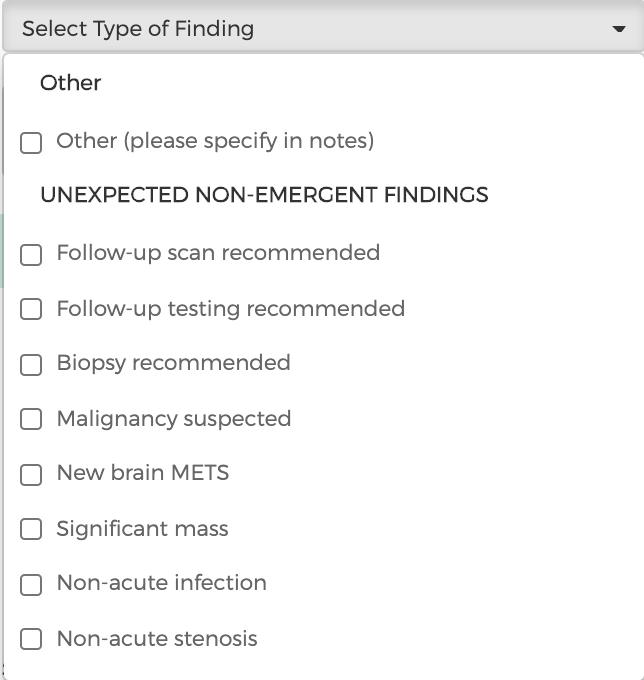
Step 2: Select Type of Finding
Once the severity has been selected, you will have to specify the type of finding. You can either select one of the options from the dropdown list or select "Other" and explain the type of finding in the notes section. This will give the client context regarding the case before they reach out to the patient.
Step 3: Publish Report with Critical Finding
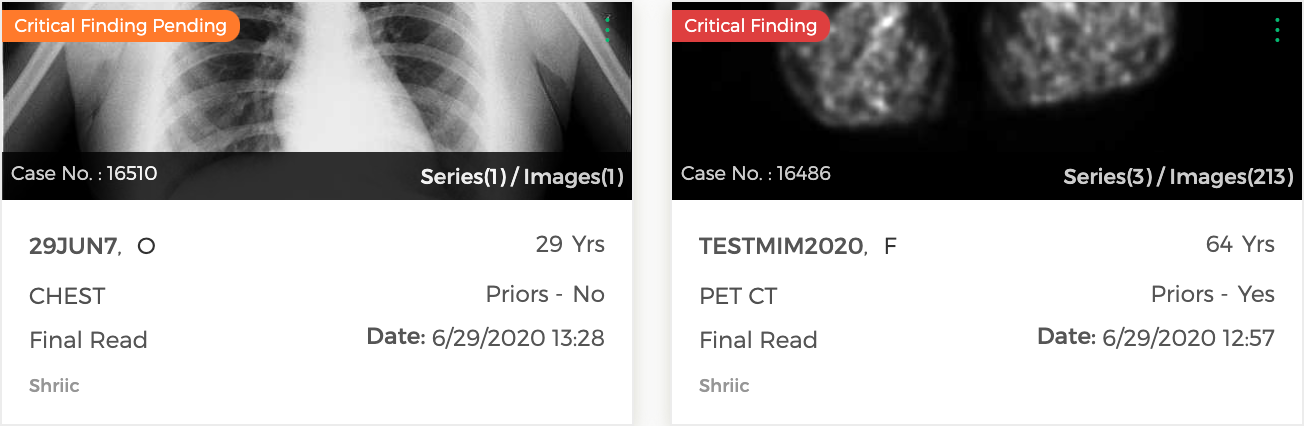
Once the report is published, the critical finding case can be accessed from the Completed Cases tab. If a case needs acknowledgement from the client, it will have an orange "Critical Finding Pending" tag. Once the case has been resolved from the client's side, it will have a red “Critical Finding” status tag.
Step 4: Add Addendum to a Critical Finding Case
Even though you have the option to add an addendum to an unresolved critical finding case, we encourage you to not add an addendum until the imaging center has resolved or acknowledged the critical finding.
If you wish to publish an addendum with critical finding, you will follow the same workflow as mentioned above. You will have to select the severity and type of finding before publishing the report.
Comments
0 comments
Please sign in to leave a comment.